Software · a portfolio in five stories2024 – 2026Ziyang Xu

Five pieces of software, each made for someone

Made for …

  1. 01Myself and my buddies — a study toolZiyang Vocab Master
  2. 02Mum — a browser assistant she can useDSH Browser Companion
  3. 03Truth — models that check each otherPiMoa + JEV
  4. 04The daily job — hands for an AI agentoffice · browser · Sheet Shadow
  5. 05Everyone and everywhere — where the tools live, even inside WeChatgateway · cloud · WeChat

Every piece of software here started with someone who needed it. First it was me and my buddies. Then my mum. Then I needed AI to stop telling me confident lies, to do real work without breaking things, and to be reachable from anywhere. Each chapter tells one of those stories — with the measurements, the failures, and the things I deleted.

Written & built byZiyang Xu (Jerry)
Checked bythree models and a calibrated judge
SchoolThe Experimental High School Attached to Beijing Normal University
Sourcepublic on GitHub · github.com/jerryxugit-2026
NoteEvery account, key and password in the published source is a mock. Real credentials never leave my machine.
No. 01 / 05Made for myself and my buddies2024

Made for myself and my buddies

The list nobody made for me

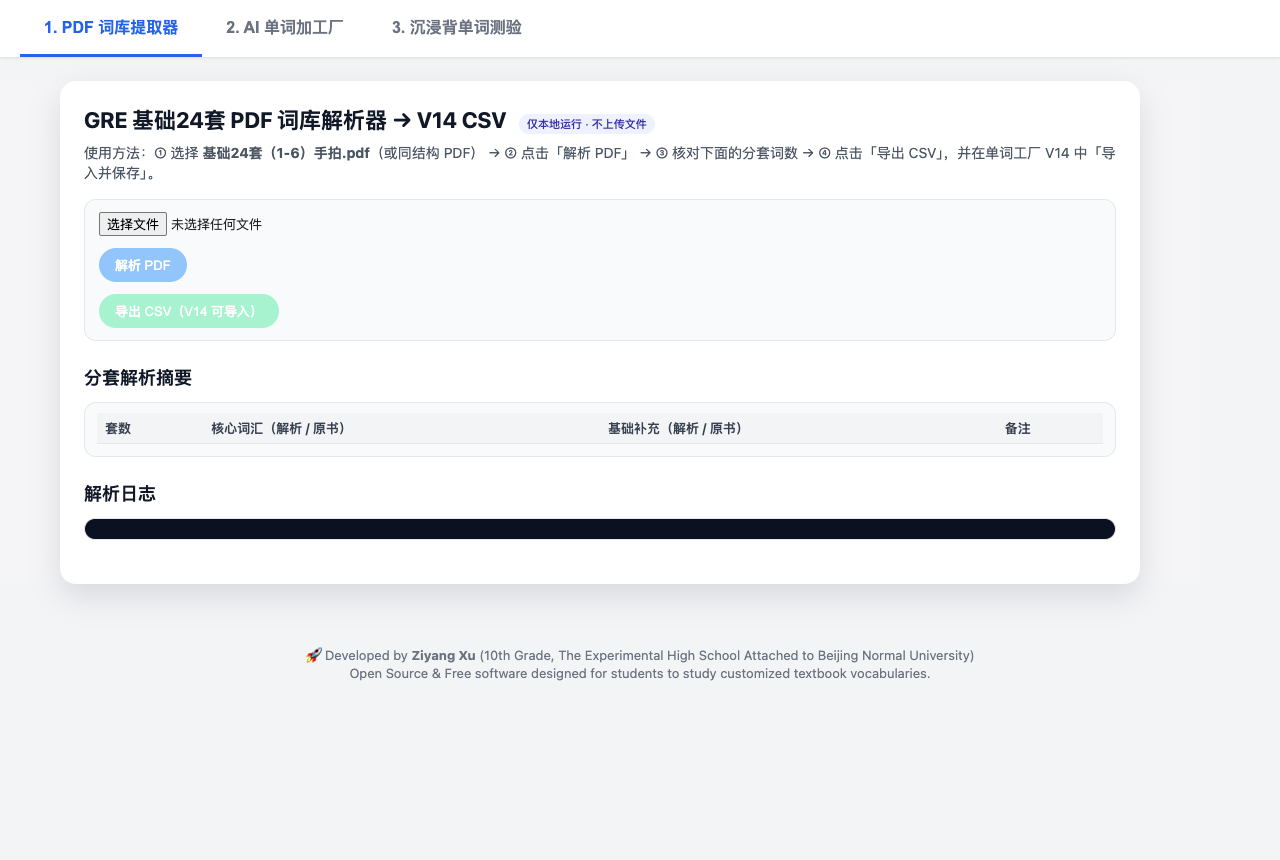
Ziyang Vocab Master — your own PDF becomes your own study deck.

In 10th grade, the words I actually had to learn were sitting in my own textbooks and past exam papers. Every vocabulary app I tried wanted me to study its list instead.

So I built one that starts from my PDF. Drop in a textbook or an exam paper: the extractor pulls out the vocabulary and filters out the common-word noise; an AI “word factory” adds pronunciation, definitions, word roots, collocations and an image cue; and spaced-repetition flashcards drill every word four ways — association, context, spelling, and saying it out loud.

It runs entirely in the browser: no server, no account, no tracking. The deck you build stays on your machine.

One rule I kept from day one: a good tool for learning should not be hidden behind a paywall.

I built it for myself, then made it free so my buddies — and any student — could use it too. It holds a registered software copyright (软件著作权).

Specification
Built
2024, for my own studying
For
me, my buddies, and any student who learns from their own materials
Stack
HTML + JavaScript in the browser; Gemini API with your own free key; Pexels image cues
Data
stays on your machine — no server, no account
Cost
free
Status
registered software copyright
Ziyang Vocab Master interface: PDF extractor, AI word factory, flashcard quiz
FIG 01.1 — The real interface: three steps, from your PDF to a quiz.
ProjectZiyang Vocab Master
Made formyself & my buddies
Date2024
Sheet01 / 05
No. 02 / 05Made for Mum2026

Made for Mum

My mum couldn’t use it

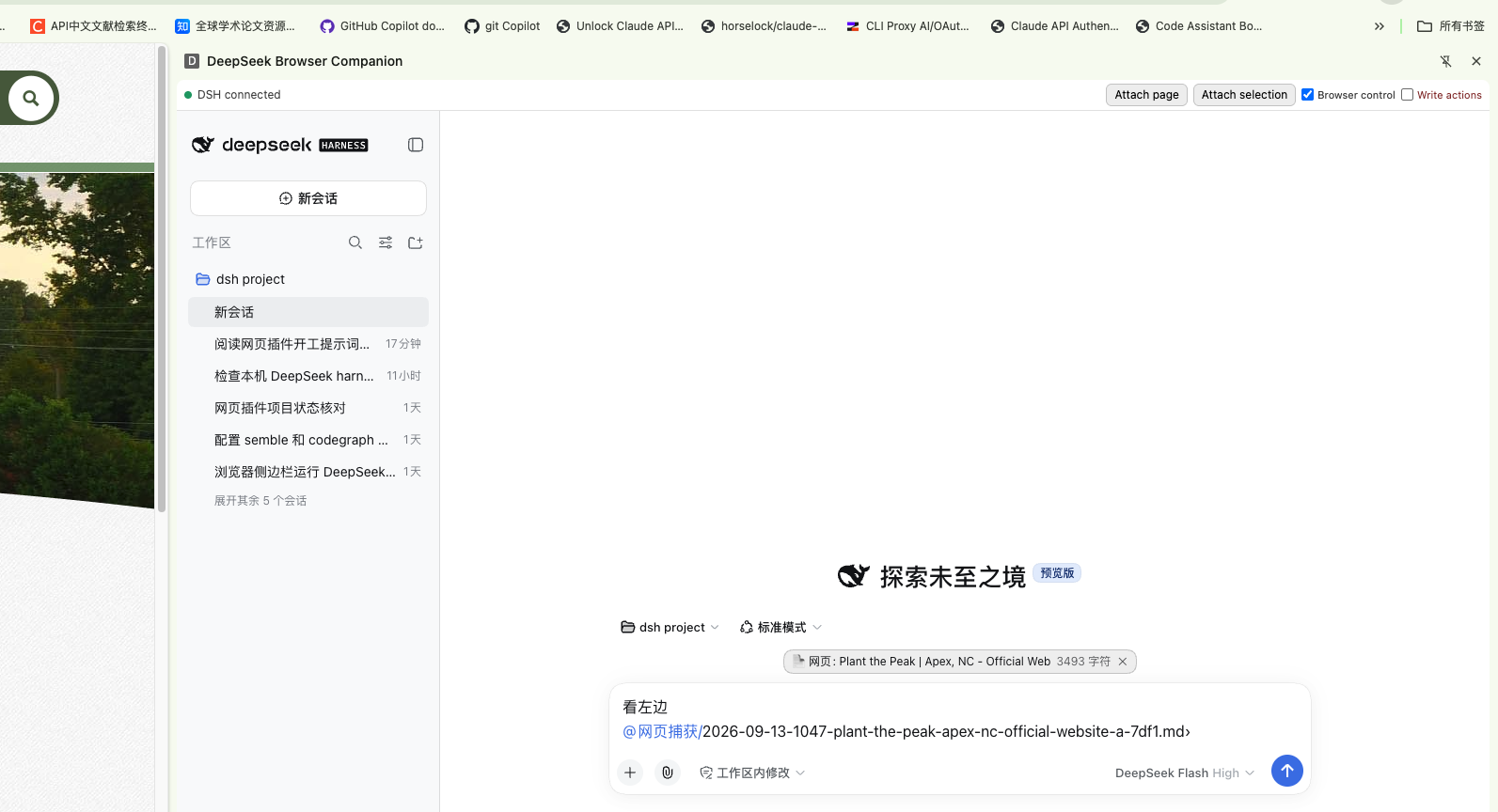
DSH Browser Companion — an AI assistant that sits next to the page you are reading.

I loved a ChatGPT extension that sits beside the web page you are reading. It filled in forms, translated pages, summarised fifty-page documents. Then I tried to set it up for my mum — and she couldn’t use it. In China, the ChatGPT and Gemini browser extensions simply don’t work for her.

DeepSeek does work in China, and it is very good. But DeepSeek’s agent had no browser extension. So I built one, and I made every design decision with one user in mind:

  • Her pages stay at home. The agent runs on our own computer; nothing is sent to a third-party browser service.
  • It asks before it acts. Reading is free. Clicking, typing and submitting happen one confirmation at a time.
  • She will never open a compiler. Installation is three steps — download, run two commands, load the extension — and the setup wizard asks before every change.

Now it reads a whole page, a selection, or a screenshot; and when it is allowed to, it fills forms, translates while keeping the layout, and collects the same information across several tabs.

The experience I loved, made usable by the people around me.

Specification
Built
2026
For
my mum, and anyone who can’t use ChatGPT or Gemini extensions
Form
Chrome side-panel extension + a local agent (DeepSeek Harness)
Install
3 steps · Node 22+ · no compiler
Privacy
runs locally; no third-party browser service
Licence
MIT
DSH Browser Companion side panel with buttons to attach the page, attach a selection, enable browser control and enable write actions
FIG 02.1 — The side panel. Write actions sit behind their own switch.
Design notes — requirement → decision
RequirementDecision
Works in ChinaBuilt on DeepSeek, not on ChatGPT or Gemini
Her pages stay privateThe agent runs on our own computer
No surprisesEvery write action needs one confirmation
No developer toolsA three-step wizard; it even builds the extension itself
ProjectDSH Browser Companion
Made forMum
Date2026
Sheet02 / 05
No. 03 / 05Made for truth2025 – 2026

Made for truth

The model that said “looks fine”

PiMoa — several AI models review the same work blind. JEV — a judge that knows how sure it is.

Act 1 · one confident answer

An AI model reviewed my code and said it looked fine. It was wrong, and it sounded completely sure. That was the lesson: one model’s confidence is not evidence.

Act 2 · ask several, blind

PiMoa sends the same question to several models at once. They cannot see each other’s answers, and a final model weighs them. They work inside a read-only sandbox — no internet, no writing to disk, their keys removed — and every claim has to come with a file and a line number. FAILED Version 1 broke on real code: after minutes of work it returned an empty answer.

Act 3 · measure, don’t guess

I did not just raise the timeout. I measured. A 14,000-token task had grown to 251,808 tokens, because every step re-sent the whole conversation. Cited line numbers were off by 130, because the models were counting lines — so PiMoa now prints the real line numbers beside the code, and the models copy them. One model wrote 10,902 characters where the others wrote about 500, so its output is capped. On the same real 1,004-line review, version 2 finished in 22.7 seconds and every cited line number was exact.

Act 4 · a panel can be wrong together

So I added JEV: a judge that answers only closed questions, with a probability. I measured that probability too. Across 212 real judgments, when JEV said it was at least 0.99 sure, it was right 96.1 % of the time; when it said 0.5 – 0.7, only 33.3 %. The rule follows from the data: below 0.7, a human looks. Its blind spots are written on its first page — dates, counting and multi-step reasoning are weak, and given an image it confidently invents an answer, so it refuses images.

Act 5 · keep what works, delete what doesn’t

Its first real job: 3,660 lines of code, five rounds — 10 major and 32 minor problems found, and 7 false alarms (4 of them fake “blockers”) thrown out before they reached me. Then, in October, the numbers showed that an automatic “close the case” step I had designed was not worth what it cost. DELETED I removed it and wrote down why.

An answer is worth what its evidence is worth.

Specification
Form
two MCP servers — the protocol AI assistants use to call tools
Stack
PiMoa: TypeScript, Node 22+ · JEV: Go
Safety
read-only sandbox; fail closed — if one reviewer fails, the whole run fails rather than give half an answer
Calibration
212 judgments; ≥ 0.99 → 96.1 % correct; 0.5 – 0.7 → 33.3 %
Honest status
6 PiMoa test files and 1 JEV test are red on my own machine too; they are listed in the README, not hidden
Licence
MIT
YOUR AI AGENT PiMoaexact files · real line numbers MODEL AMODEL BMODEL C blindblindblind AGGREGATOR JEV JUDGEp = calibrated probability p ≥ 0.7verdict + file:line evidence p < 0.7a human looks SANDBOX · read-only · no network · no keys
FIG 03.1 — Three blind reviewers in a sandbox, one aggregator, one calibrated judge. If any reviewer fails, the run fails.
Revision block
RevWhat changedWhy
APiMoa v1: blind multi-model review in a sandbox FAILEDReturned empty answers on real code after minutes of work
BPiMoa v2: real line numbers, tool-call and token caps, per-model output capsMeasured three causes — 251,808 tokens, 130-line drift, a 10,902-character answer. Result: 22.7 s, exact line numbers
CAdded JEV, the calibrated judgeA panel of models can be wrong together; 212 judgments showed its probability means something
DTwelve small batches teaching the pipeline to ask for missing materialThe judge kept saying “not enough evidence”; now the gap is carried into the next round automatically
ERemoved an automatic “close the case” step DELETEDAn effectiveness analysis (Oct 2026) showed it cost more than it saved
ProjectPiMoa + JEV
Made fortruth
Date2025 – 26
Sheet03 / 05
No. 04 / 05Made for the daily job2025 – 2026

Made for the daily job

Hands for the agent

An AI that only talks is an adviser. Daily work is spreadsheets, documents, slides and web pages.

One door for Office files

office-gateway is a single door for Word, Excel and PowerPoint. Behind it, every job goes to the engine that does it best: quick reads and edits to a command-line tool, heavy formula work to a calculation engine, delicate Excel edits through a lossless unpack-and-repack, slides rendered from HTML into real PowerPoint, Word files built directly from their XML format. The engines themselves come from open-source tools and skill packs; what I wrote is the part that decides which hand is safe for which job.

One door for the web

browser-gateway does the same for websites: four engines behind one door — one that clicks and types, 145 adapters that pull structured data from specific sites, read-only diagnostics, and custom scripts. Two lessons live in its comments. On 6 August I found I had described one engine wrongly — it is an installer and does not handle logins — and fixed it that day, because an AI agent believes whatever a tool says about itself. And a live browser is never shared: two agents typing into one tab corrupt each other’s work, so each one gets its own.

The hand I had to build myself

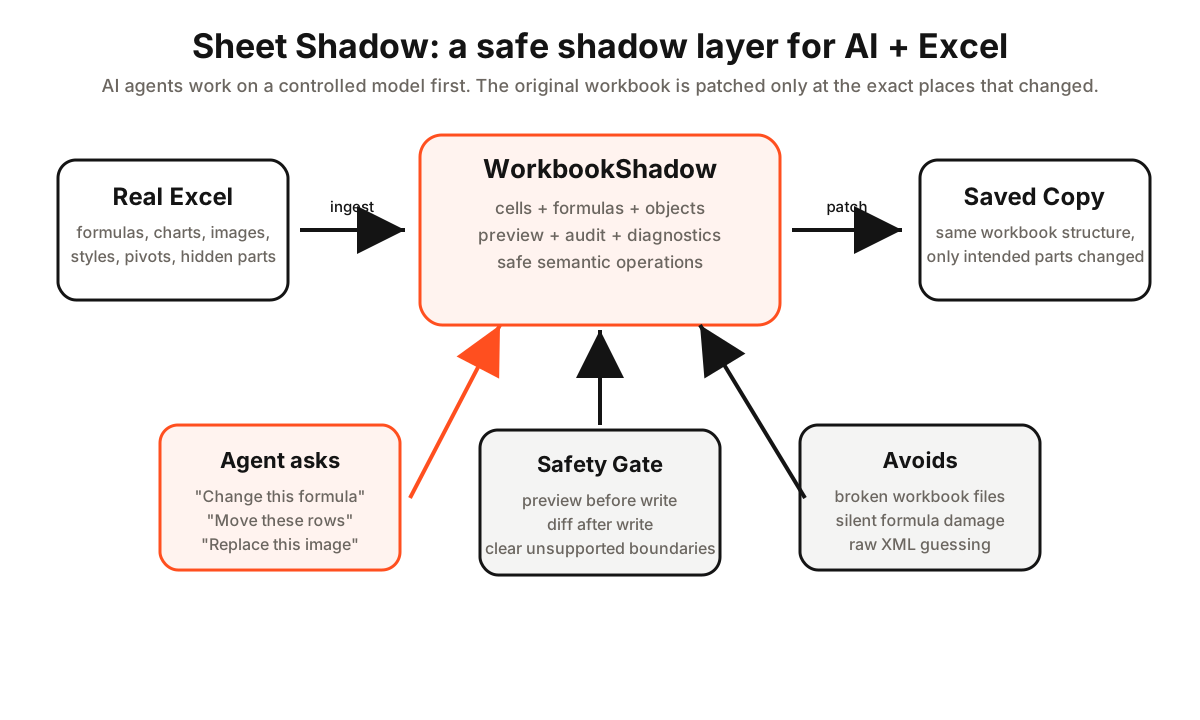
One job no ready-made engine did safely: change one number in a real workbook — full of formulas, charts and hidden sheets — without quietly breaking everything else. An agent asked to do it will often rewrite the whole file; it still opens, and it is still wrong. Sheet Shadow lets the agent edit a shadow copy first, shows the impact, writes only the parts that changed into a new file, and runs a final check for formula errors, damaged structure and changed macros before handing it back.

Routing decides which hand to use. Sheet Shadow is the hand I had to build myself.

Specification
office
Python MCP server; routes Word / Excel / PowerPoint jobs to five engines
browser
Python MCP server; 4 engines, 145 site adapters
Sheet Shadow
Go MCP server; preview before write; save to a new copy; tested against real workbooks
Source
all three public, MIT: office-gateway · browser-gateway · Sheet Shadow. The pptx engine inside office-gateway stays external — its upstream is source-available, not open.
AI AGENT office-gateway browser-gateway Sheet Shadowbuilt from scratch quick read / editformula enginelossless repackHTML → slidesXML → Word click & type145 site adaptersread-only diagnosticscustom scripts 1 · shadow copy2 · preview impact3 · write changed parts4 · final check RULES, each learned from an incident: · a tool must describe itself truthfully · a live browser is never shared · a workbook is saved to a new copy
FIG 04.1 — Two routers that pick the right hand, and one hand built for the job no engine did safely.
office-gateway · one real job, three steps (paths mocked)
// 1 — the agent tries to overwrite a cell in a workbook full of formulas
{ "action": "edit_content", "file_path": "…/Q3_report.xlsx" }
⮑ [BLOCKED BY GATEWAY] "Do NOT retry identically. Run analyze_formula_impact first."

// 2 — the pre-check shows what the edit would cut
{ "action": "analyze_formula_impact" }
"impacted_formulas": ["Summary!D12", "Summary!F12"]

// 3 — same edit, now precise: two cells, everything else untouched
{ "action": "edit_content" } → "status": "success" ✓ zero-loss repack
Sheet Shadow principle: the agent edits a shadow model, previews, applies semantic operations, and saves a new copy by targeted patching
FIG 04.2 — Sheet Shadow in detail: the original workbook is only touched where a change was intended — and never in place.
Projectoffice · browser · Sheet Shadow
Made forthe daily job
Date2025 – 26
Sheet04 / 05
No. 05 / 05Made for everyone and everywhereOct 2026

Made for everyone and everywhere

Where should the tools live?

The tools moved house four times in one week, each time because something broke. Then they made one last move — into WeChat, where people already are.

Chapter mapA · shared gatewayB · cloud computerC · public door, removedD · Cloudflare WorkerE · into WeChat

By October, three AI assistants on my Mac were using these tools. Then I wanted to reach them from my phone while the Mac was off. Then I wanted assistants from other companies to use them too — including one that cannot install anything at all.

Move A · a shared gateway on my Mac

Each assistant was launching its own copy of every tool, so I built one gateway they all share. One day, six tools started at the same moment and all of them silently hung: macOS gives a background service only 256 file handles. The fix is a single line — 10240 — with a comment beside it saying it must never be deleted.

Move B · a rented cloud computer

To keep working while the Mac sleeps, the same gateway now also runs on a small rented cloud computer, shared by three assistants, behind a private network that only my own devices can join.

Move C · tearing a door down SUPERSEDED

The cloud computer is billed by the minute and sleeps when idle. A permanently open public tunnel counted as activity, so it never slept — about 76 € a month. I tested three ways to get a cheap public entrance; all three were dead ends, and all three are written down so nobody walks them again.

Move D · a free worker on the open internet

One assistant cannot install software, speaks an older version of the protocol, and cannot send login headers. So the tools moved to a Cloudflare Worker that speaks both protocol versions and signs in with OAuth. Today it offers 347 abilities — reading the calendar, sending mail, opening files, writing notes — to 10 AI assistants. The local gateway was not deleted: COLD STANDBY

Moving house carefully is its own skill. One move touched about 40 references across configuration files and scripts. I copied first, checked the copy side by side, switched over in a planned window, watched it for 24 hours, and only then removed the old one — with the rollback practised in advance. It still found a way to break: macOS will not start a background service from an external disk. The fix was to split the layers — the service on the internal disk, the tools wherever they live.

The architecture is a fossil record of things that broke.

Move E · into WeChat

Tools on a server help AI assistants. People live somewhere else — in China, that place is WeChat. Family plans, school notices and the articles worth keeping all arrive there, and none of it ever reached an assistant. So the last move went from inside WeChat to an AI assistant, and back.

Forward it, and it is handled

Forward a message or an article to a bot in WeChat. A small program on an old Mac at home receives it through Tencent’s official bot channel and drops it into an inbox folder. Muse — an AI assistant that lives on its own cloud computer — checks that inbox every minute, puts any dates into the calendar, summarises the article, and writes a reply into an outbox. The program sends the reply back into the same WeChat chat.

Why an old Mac at home? WeChat blocks article requests that come from cloud servers. So the fetching happens on a home connection, and the assistant in the cloud only ever reads the saved text. It can reach exactly one folder on that Mac — nothing else.

Tap “favourite”, and it is filed

The second stream needs no action at all. When I tap “favourite” on an article — a habit I already had — it appears in a knowledge base about two minutes later, sorted into one of 12 folders: by my own rules first, and by a small language model when no rule fits. It now holds about 1,780 items. Forward a WeChat video post to the bot, and it goes straight into the same knowledge base, with a ✅ in the chat.

Ask it, and it answers from my own reading

A knowledge base you cannot ask is just a drawer. So the same corpus gets a personal RAG layer. The full text of every article stays on my own machine as Markdown — the master copy, beyond any app’s lock-in — and a SQLite index recalls candidates two ways: BM25 for exact keywords, multilingual text embeddings for meaning. A small cross-encoder reranker (a qwen3 reranking model) re-sorts the merged list, and the language model I point it at answers with the sources attached. The stack degrades gracefully: if the embedding service is down, keyword search still answers — nothing in the pipeline blocks.

Written down: what does not work

The bot channel does not deliver merged chat-history cards, so the bot politely asks for messages one at a time. Image-only posts have no text, so it asks for a screenshot. Favourited images and files carry no link, so they cannot be filed DEAD END — recorded as one. A reply can never be sent twice: one running copy, a duplicate check, and an atomic claim on every reply. And the honest weak point: the old Mac has to stay on. A plan to move it onto a cloud computer is written down and waiting.

The best interface is the one people already use every day.
Specification
Clients
10 AI assistants from different companies
Served
11 services · 347 abilities (calendar, mail, files, notes …)
Protocol
MCP 2026-07-28 in front; older tools behind, started only when needed
Cost
Cloudflare free tier; the cloud computer sleeps when idle
Security
private network with an access list; OAuth; every account, key and password in the public source is a mock
WeChat
forward → handled in about a minute; favourite → filed in about two minutes; ~1,780 items in 12 folders; retrieval = BM25 + embeddings → cross-encoder rerank
Licence
MIT: gateway & Worker — and the WeChat bridge too, a fork of the open-source dorokuma/wechatbridge with my own backend added: Build-WeChat-Bridge.
REV AREV BREV CREV D MAC · gateway3 assistants share one pool256 → 10240 file handles CLOUD COMPUTERworks while the Mac sleepsprivate network · access list PUBLIC TUNNELnever sleeps · ≈76 € / month CLOUDFLARE WORKERfree · 2 protocols · OAuth11 endpoints · 347 tools assistants on Macassistants in cloudother companies’ AIs 10 AI assistants Mac gateway keptas a cold standby
FIG 05.1 — Four moves, each forced by a specific failure. Nothing that still works was thrown away.
WeChaton my phone STREAM 1 · FORWARD IT STREAM 2 · TAP “FAVOURITE” Tencent officialbot channel OLD MAC AT HOMEhome connection · fetches articles inbox · outbox reads new favouritesevery ~2 minutes MUSE · AI in the cloud checks the inbox every minutedates → calendar · article → summarycan reach one folder, nothing else reply back into the chat KNOWLEDGE BASE · PERSONAL RAG my rules first, then a small model BM25 + embeddings → rerank → answer 12 folders · ~1,780 items
FIG 05.2 — Move E. Two streams out of WeChat: forward something and an AI assistant handles it; tap “favourite” and it is filed — into a personal RAG: two-way recall, a reranker, answers with sources. The fetching stays on a home connection.
Revision block
RevDateWhere the tools wentWhat forced the move
A2026-10-19A shared gateway on my MacSix tools started together and silently hung — 256 file handles
B2026-10-21A rented cloud computerWork had to continue while the Mac was off
C2026-10-22Public entrance removed SUPERSEDEDAn always-open tunnel kept the machine awake — ≈ 76 € a month
D2026-10-22 → 23A free Cloudflare Worker; Mac kept as cold standbyAn assistant that cannot install anything, speaks an older protocol and cannot send headers
E2026-10-21 → 25Into WeChat: a bridge on an old Mac at home, Muse in the cloud — plus a personal RAG over the corpusLife happens in WeChat, and WeChat blocks cloud servers from fetching articles
ProjectMCP gateway · cloud · Worker
Made foreveryone
DateOct 2026
Sheet05 / 05
General notesAcross all fiveWhat I keep relearning
  1. Build for the person next to you.Made for my buddies · Made for Mum
  2. Measure before you argue.Made for truth
  3. Fail closed: no answer beats a confident half-answer.Made for truth · the daily job
  4. Write the failures down — and delete what doesn’t earn its keep.Every “failed” and “deleted”